Tutorial · WebMCP · W3C CG-DRAFT
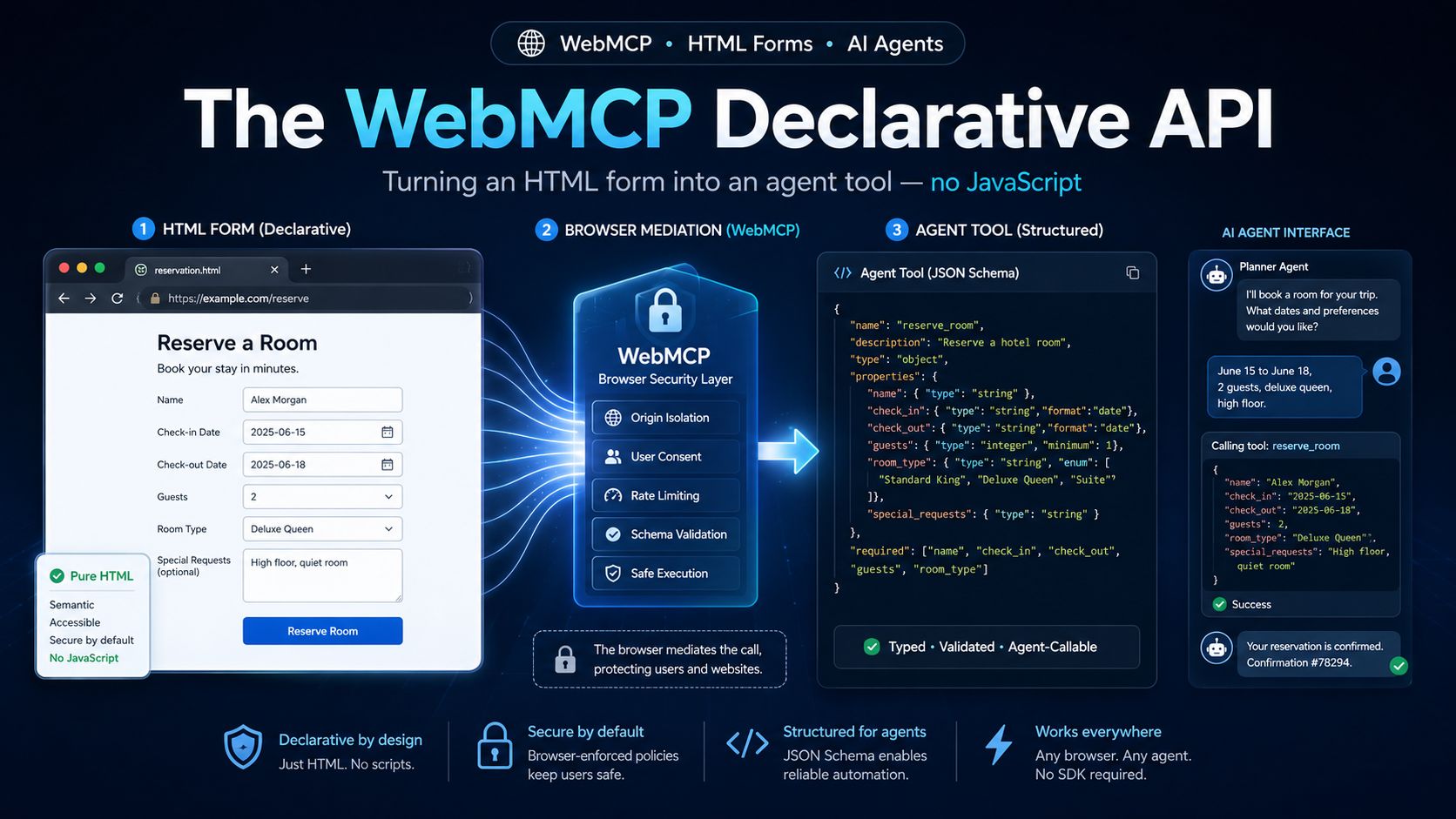
The Declarative API of WebMCP (Web Machine Context Protocol) lets a website expose its HTML forms as structured tools, directly callable by an AI agent, without writing a single line of JavaScript. This reference article, written for front-end developers and architects, breaks down the W3C proposal, the HTML-to-JSON-Schema mapping, the browser security guardrails, and the validation procedure.
Fact-checked and updated on September st, 2026 for the WebMCP ecosystem. Primary sources are cited at the end of the article.
Why WebMCP : the end of visual scraping on forms
Before WebMCP, an AI agent that wanted to fill a booking form had to analyse the DOM, guess the role of each field, and simulate clicks. This approach, inherited from testing tools (Playwright, Selenium), was fragile and token-hungry : a single CSS class change was enough to break the interaction flow, and each interaction consumed thousands of vision tokens to interpret the screen.
The WebMCP inverts the relationship. Instead of asking the agent to guess, the site declares its capabilities as structured tools. The browser acts as a trusted intermediary : it synthesises a JSON Schema from the HTML, exposes an document.modelContext API, and lets the agent call the tool with typed parameters. The Imperative API (document.modelContext.registerTool() in JavaScript) handles complex flows ; the Declarative API, the subject of this guide, handles pure-HTML forms.
Genesis of the standard and implementation status
WebMCP is incubated inside the W3C Web Machine Learning Community Group. The specification is co-authored by Brandon Walderman and Dominic Farolino as editors, with active contributions from Khushal Sagar (Google) and other Google and Microsoft engineers. The official status remains CG-DRAFT as of September st, 2026.
On the browser side, the rollout breaks down as follows :
- Chrome 146 (February 2026) : early preview behind the flag
chrome://flags/#enable-webmcp-testing. Good for exploring, not for production. - Chrome 149 (June 2026) : start of the public origin trial, accessible without a flag on registered origins. The Model Context Tool Inspector extension (François Beaufort, Chrome team) lets you visualise the registered tools.
- Chrome 150+ : progressive stabilisation. The pair
navigator.modelContextremains supported as an alias for backward compatibility, but the canonical form is nowdocument.modelContext, which ties the tool lifecycle to the active document.
document.modelContext and plan a fallback to navigator.modelContext if you maintain older versions.Preparing your development environment
The Declarative API can be tested without a remote server. Three prerequisites :
- Chrome 149 or later, ideally Canary or Dev for the most recent builds.
- Flag enabled :
chrome://flags/#enable-webmcp-testing→ Enabled → Relaunch. The flag persists per profile. - Secure context : HTTPS in production, or
http://localhostlocally. Plain HTTP does not load the API.
To check availability, open DevTools and run :
console.log(document.modelContext ?? navigator.modelContext);
// Attendus : un objet avec registerTool(), getTools(), executeTool()
If the value is undefined, the browser or the origin does not support WebMCP. Common causes are : insecure HTTP, an active Origin-Agent-Cluster: ?0 header, or a cross-origin context not allowed by the Permissions Policy.
Semantic HTML audit : the absolute prerequisite
The Declarative API relies entirely on markup quality. The browser synthesises the JSON Schema from the <label>, <input>, <select> tags and their native attributes (type, required, min, max). A form built from nested <div> elements without <label for> will produce an empty or inconsistent schema.
<label>. Inspect the rendered DOM with DevTools before adding WebMCP attributes. Without <label>, the browser falls back to aria-description, and finally to name — which produces opaque names for the language model.Case study : the « Le Petit Bistro » form
Google Chrome Labs maintains a canonical demo illustrating the Declarative API : booking a table at Le Petit Bistro. This is the example we are going to turn into an agent tool, starting from strictly semantic HTML with no JavaScript.
<form action="/api/reservations" method="POST">
  <h2>Book a table at Le Petit Bistro</h2>

  <label for="first_name">First name</label>
  <input type="text" id="first_name" name="first_name" required />

  <label for="last_name">Last name</label>
  <input type="text" id="last_name" name="last_name" required />

  <label for="date">Reservation date</label>
  <input type="date" id="date" name="date" required />

  <label for="time">Preferred time</label>
  <input type="time" id="time" name="time" required />

  <label for="party_size">Number of guests</label>
  <input type="number" id="party_size" name="party_size" min="1" max="10" required />

  <label for="seating_area">Seating preference</label>
  <select id="seating_area" name="seating_area" required>
    <option value="inside">Indoors (quiet atmosphere)</option>
    <option value="terrace">On the terrace (street view)</option>
  </select>

  <button type="submit">Confirm reservation</button>
</form>
This form works fine for a human. For an agent, it stays opaque : without WebMCP, the agent must analyse every pixel, guess the meaning of party_size, and try to fill seating_area with a free-form string. The Declarative API replaces this guesswork with a formal contract.
Annotating the form : the three root attributes
The transformation from an inert HTML form into a WebMCP tool happens by adding three specific attributes on the <form> tag :
| Attribute | Requirement | Role |
|---|---|---|
toolname |
Required | Unique identifier the agent will invoke (e.g. : book_table). snake_case or camelCase recommended. |
tooldescription |
Required | Natural-language description of the tool’s purpose. This is the critical parameter for LLM routing. Without it, the form is invisible to the agent. |
toolautosubmit |
Optional | If present, the browser submits automatically after filling. For irreversible actions (payment, deletion), it must be omitted to enforce human confirmation. |
Here is the annotated form, with no other modification :
<form action="/api/reservations" method="POST"
      toolname="book_table"
      tooldescription="Starts a table reservation at the Le Petit Bistro restaurant. The client will have to confirm visually before the reservation takes effect.">
  ...
</form>name + description. A vague or marketing-flavoured description lowers the correct-invocation rate. Follow the recommendations of the official Chrome documentation : positive phrasing, clear distinction between initiation and execution.Semantic typing : enriching each field
To refine the generated JSON Schema, the Declarative API offers an additional attribute applicable on <input>, <select> and <textarea> fields :
toolparamdescription: explicit description of the property. It overrides the value of the associated<label>if present, otherwise the browser triesaria-description, and finallynameas a last resort.
Here is the Petit Bistro form with each field annotated :
<label for="first_name">First name</label>
<input type="text" id="first_name" name="first_name" required
       toolparamdescription="The customer’s first name who makes the reservation." />

<label for="last_name">Last name</label>
<input type="text" id="last_name" name="last_name" required
       toolparamdescription="The customer’s last name who makes the reservation." />

<label for="date">Reservation date</label>
<input type="date" id="date" name="date" required
       toolparamdescription="The desired date, in YYYY-MM-DD format." />

<label for="time">Preferred time</label>
<input type="time" id="time" name="time" required
       toolparamdescription="Local reservation time, for example 19:30." />

<label for="party_size">Number of guests</label>
<input type="number" id="party_size" name="party_size" min="1" max="10" required
       toolparamdescription="Total number of guests. Maximum 10." />

<label for="seating_area">Seating preference</label>
<select id="seating_area" name="seating_area" required
        toolparamdescription="Table ambiance: indoors or terrace.">
  <option value="inside">Indoors (quiet atmosphere)</option>
  <option value="terrace">On the terrace (street view)</option>
</select>
HTML → JSON Schema translation mechanics (draft-07)
Without a single line of JavaScript, the browser silently assembles a draft-07 JSON Schema object and exposes it through document.modelContext.getTools(). The deterministic mapping is as follows :
| HTML element | Equivalent JSON Schema |
|---|---|
type="text|date|time" |
"type": "string" |
type="number" |
"type": "number" with "minimum" and "maximum" derived from min/max |
type="checkbox" |
"type": "boolean" |
<select> + <option> |
Array anyOf with const = value and title = visible text, plus a synthesised enum array |
required |
Field name added to the root-level "required": [] array |
For our form, the browser produces the following tool (excerpt) :
[
  {
    "name": "book_table",
    "description": "Starts a table reservation at the Le Petit Bistro restaurant…",
    "inputSchema": {
      "type": "object",
      "properties": {
        "first_name": { "type": "string", "description": "The customer’s first name…" },
        "party_size": {
          "type": "number",
          "minimum": 1, "maximum": 10,
          "description": "Total number of guests. Maximum 10."
        },
        "seating_area": {
          "type": "string",
          "anyOf": [
            { "type": "string", "const": "inside", "title": "Indoors (quiet atmosphere)" },
            { "type": "string", "const": "terrace", "title": "On the terrace (street view)" }
          ],
          "enum": ["inside", "terrace"],
          "description": "Table ambiance: indoors or terrace."
        }
      },
      "required": ["first_name","last_name","date","time","party_size","seating_area"]
    }
  }
]
This schema acts as a structural firewall : if the agent sends "seating_area": "terrasse_exterieure" or omits party_size, the call fails before even reaching your backend, which reduces self-correction latency.
Seeing the agent in action : CSS pseudo-classes
When the agent fills the form, the browser applies dedicated CSS pseudo-classes, provided by the specification. They let you visually signal to the user that an input is agent-driven :
:tool-form-active: applied to the<form>while the agent is filling in the fields.:tool-submit-active: applied to the submit button when the agent is preparing the submission.
Customise these styles to integrate them into your design system :
form:tool-form-active {
  box-shadow: 0 0 0 2px #2657d6 inset;
  border-radius: 8px;
  transition: box-shadow 200ms ease;
}
form:tool-form-active::before {
  content: "Your assistant is filling the form…";
  display: block;
  font-weight: 600;
  color: #2657d6;
  margin-bottom: 8px;
}

button[type="submit"]:tool-submit-active {
  background: #16a34a;
  transform: scale(1.02);
}Lifecycle events
The specification exposes two non-cancellable events on window, allowing the page to react to agent activity :
window.addEventListener('toolactivated', ({ toolName }) => {
  console.log(`Tool ${toolName} activated by the agent`);
  // Show an "agent mode" banner
});

window.addEventListener('toolcancel', ({ toolName }) => {
  console.log(`Tool ${toolName} cancelled`);
  // Hide the banner, restore the default UI
});
These events carry a toolName identifying the targeted form, useful when several tools coexist on the same page.
Security model and Human-in-the-Loop
WebMCP applies the Human-in-the-Loop principle by default. Without toolautosubmit, the agent pre-fills the fields, focuses the form, then waits for a human to click Submit. This is the main guardrail against accidental execution of irreversible actions.
For our table booking — which changes the restaurant’s availability — the toolautosubmit attribute must stay absent. The agent proposes, the human disposes.
toolautosubmit : only for idempotent read operations (search, filter, calculation). Ban it on anything touching payment, deletion, or permission changes.Beyond Human-in-the-Loop, security rests on three layers :
- Secure context : HTTPS or localhost only. Plain HTTP disables WebMCP.
- Origin isolation : the API is disabled if
Origin-Agent-Cluster: ?0is present, or ifdocument.domainhas been modified. - Permissions Policy : by default,
toolsis limited toself. To expose a tool inside a trusted cross-origin iframe, the host page must explicitly allow it viaallow="tools".
Going further : the Hybrid API
For cases where you need to control the server response after submission (for example to return structured JSON the agent can consume), the official documentation describes the Hybrid API : it extends SubmitEvent with two key additions :
SubmitEvent.agentInvoked: boolean set totrueif the submission comes from an agent (with or without a human confirmation click).SubmitEvent.respondWith(promise): lets you return a structured JSON object directly to the agent, short-circuiting the default navigation.
This API stays compatible with a 100 % HTML form for discovery ; only submission handling needs a few lines of JavaScript.
Test procedure with Model Context Tool Inspector
The official extension Model Context Tool Inspector (Chrome Web Store, François Beaufort) is the best validation tool. It provides :
- Discovery : panel listing all WebMCP tools registered on the current page.
- Schema inspection : visualisation of the JSON Schema synthesised by the browser.
- Manual execution : a dynamically generated form to test the tool with chosen parameters.
- LLM simulation : integration of a Gemini API key (by default
gemini-3-flash-preview) to converse in natural language and check routing.
Recommended four-step procedure :
- Load the annotated form page and verify the tool appears in the inspector with the right
nameanddescription. - Inspect the generated JSON Schema and verify the types and enums are correct.
- Run manually with valid parameters, then invalid ones (e.g. :
party_size: 25), to observe the error behaviour. - In Gemini mode, write a natural request (« Book a table for four at 8pm on the terrace ») and verify the agent correctly extracts the parameters.
Conclusion
The WebMCP Declarative API proves that careful semantic HTML alone is enough, without JavaScript, to expose a form as a production-quality structured tool. The browser handles the JSON Schema synthesis, parameter typing, visual feedback, and security guardrails. The developer stays focused on what matters : clean markup, a clear tooldescription, and strict Human-in-the-Loop discipline on irreversible actions.
For applications with complex business logic (asynchronous orchestration, chained API calls, distributed state management), the Imperative API document.modelContext.registerTool() takes over and extends the same principles in JavaScript. The two APIs are designed to coexist and share the same permission scheme, the same tokenisation mechanism and the same origin-isolation policy.
Primary sources
- developer.chrome.com/docs/ai/webmcp — official introduction page.
- developer.chrome.com/docs/ai/webmcp/declarative-api — Declarative API reference.
- developer.chrome.com/docs/ai/webmcp/best-practices — tool description best practices.
- developer.chrome.com/docs/agents/security — agent security (prompt injection, character budgets).
- github.com/webmachinelearning/webmcp — official specification repository.
- GoogleChromeLabs/webmcp-tools/demos/french-bistro — the « Le Petit Bistro » demo.
- Model Context Tool Inspector — official Chrome extension.
- chromestatus.com/feature/5117755740913664 — implementation status in Blink.